
Blackmagic Design PYXIS 6K Full-Frame Box Cinema Camera with L-Mount
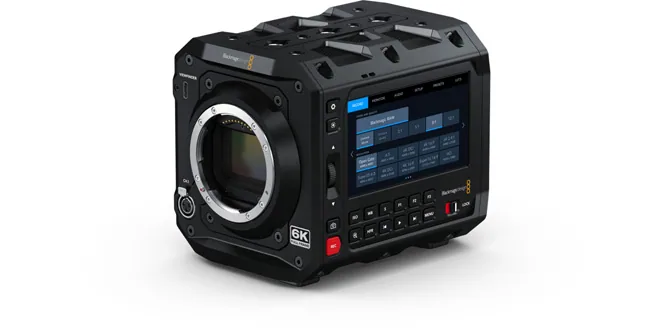
Blackmagic Design · PYXIS
$3,389.00 MSRP
Key Features
- Full Frame CMOS
- L-Mount
- Up to 120 fps
- Internal Blackmagic RAW
- Film Gen 5
🔒 Log in to add this to a kit.
In the Box
- 1 × Blackmagic Design PYXIS 6K Cinema Box Camera (Leica L)
- 1 × DaVinci Resolve Studio Activation Key
- 1 × Lens Cap
- 1 × Power Supply with International Adapters (60W)
- 1 × PYXIS SSD Mounting Plate
- 1 × PYXIS Standard Mounting Plate
D.I.T. Data Imaging Technician
Resolution
Internal Recording
Aspect Ratio
Frame Rates
Project Frame Rates
Off-Speed Frame Rates
Sensor Modes
Sensor Modes
| Resolution | Recording Area (W × H) | Crop Factor |
|---|---|---|
| 4.8K-A 6:5 4832 x 4032 | 28.76 mm × 24 mm | 1.16x est. |
Bit Depth & Color Sampling
12-Bit RAW (Logarithmic)
12-bit Log recording captures over 68 billion colors while using a logarithmic gamma curve to preserve more dynamic range and highlight/shadow detail in a visually compressed form. This combination provides maximum flexibility in post-production, especially for color grading and matching footage across different lighting conditions.
Codecs
Blackmagic RAW
Blackmagic RAW (BRAW) is a proprietary video codec developed by Blackmagic Design, primarily used for high-quality video recording with reduced file sizes. It was designed to balance the need for high-quality, flexible post-production workflows while keeping file sizes manageable, making it suitable for both high-end professional work and more accessible, streamlined projects.
Compression
12:1
12:1 compression refers to a high compression ratio where the original file size is reduced to 1/12th of its uncompressed size. This level of compression significantly decreases storage and data rate requirements, making it ideal for long recording times or situations with limited storage capacity. However, because it's a lossy process, a 12:1 ratio reduces image quality, especially in scenes with fine detail or heavy motion. These formats allow cinematographers to capture 4K or higher resolution footage with manageable file sizes, but the trade-off is less flexibility in post-production compared to lower compression settings like 3:1 or 5:1.
3:1
3:1 compression means the original data size is reduced to one-third through compression, striking a middle ground between maintaining image quality and saving storage space. In video terms, this ratio suggests that for every 3 units of uncompressed footage, only 1 unit remains after compression. It’s commonly seen in professional workflows where preserving detail is critical while still managing file sizes for storage and post-production efficiency. Compared to higher compression ratios (like 5:1 or 8:1), 3:1 typically delivers better image fidelity, making it suitable for high-end productions where visual quality is a priority.
5:1
5:1 compression refers to a data reduction ratio where the original file size is compressed to one-fifth of its original size. In video production, this means that for every 5 units of uncompressed data, only 1 unit remains after compression, significantly reducing storage and bandwidth requirements. This level of compression can be achieved through various codecs, and aims to strike a balance between image quality and efficiency. While 5:1 compression retains much of the original image detail, it's still a lossy process—meaning some data is permanently discarded—which can affect image quality.
8:1
8:1 compression refers to a data reduction ratio where the original file size is compressed to one-eigth of its original size. In video production, this means that for every 8 units of uncompressed data, only 1 unit remains after compression, significantly reducing storage and bandwidth requirements. This level of compression can be achieved through various codecs, and aims to strike a balance between image quality and efficiency. While 8:1 compression retains much of the original image detail, it's still a lossy process—meaning some data is permanently discarded—which can affect image quality.
Blackmagic Q0
Blackmagic’s Q0 compression is one of the variable bitrate (VBR) quality settings available in Blackmagic RAW (BRAW), the proprietary codec used by Blackmagic Design cameras. It’s part of their “Constant Quality” (Q) compression options, where the camera prioritizes image quality over maintaining a fixed file size.
Blackmagic Q1
Blackmagic’s Q1 compression is one of the variable bitrate (VBR) quality settings available in Blackmagic RAW (BRAW), the proprietary codec used by Blackmagic Design cameras. It’s part of their “Constant Quality” (Q) compression options, where the camera prioritizes image quality over maintaining a fixed file size.
Blackmagic Q3
Blackmagic’s Q3 compression is one of the variable bitrate (VBR) quality settings available in Blackmagic RAW (BRAW), the proprietary codec used by Blackmagic Design cameras. It’s part of their “Constant Quality” (Q) compression options, where the camera prioritizes image quality over maintaining a fixed file size.
Blackmagic Q5
Blackmagic’s Q5 compression is one of the variable bitrate (VBR) quality settings available in Blackmagic RAW (BRAW), the proprietary codec used by Blackmagic Design cameras. It’s part of their “Constant Quality” (Q) compression options, where the camera prioritizes image quality over maintaining a fixed file size.